LMS
LMS
Last updated on 30th May 2026| 11209

- Introduction to SAP SD
- Enterprise Structure in SAP SD
- Master Data in SAP SD
- Sales Document Process Overview
- Inquiry and Quotation Process
- Sales Order Processing
- Delivery and Shipping Process
- Billing and Invoice Management
- Reporting and Integration with Other SAP Modules
- Conclusion and Next Steps in SAP SD
Introduction to SAP SD
SAP Sales and Distribution (SAP SD) is one of the core modules in SAP ERP and SAP S/4HANA that manages sales, customer distribution, shipping, billing, and related business processes. It helps organizations handle the complete order-to-cash cycle, starting from customer inquiries and sales orders to product delivery and invoice generation. :contentReference[oaicite:0]{index=0} enables businesses to improve customer service, streamline sales operations, and maintain accurate transaction records in SAP SD Training. The module integrates closely with other SAP modules such as Materials Management (MM), Finance (FI), Production Planning (PP), and Customer Relationship Management (CRM). Through automation and real-time data processing, SAP SD helps organizations increase operational efficiency, improve order accuracy, and ensure timely product delivery while supporting better decision-making and customer satisfaction.

Enterprise Structure in SAP SD
Enterprise Structure in SAP SD defines the organizational framework used to manage sales and distribution activities within a company. It consists of key organizational units such as Client, Company Code, Sales Organization, Distribution Channel, Division, Sales Area, Plant, Shipping Point, and Sales Office in Enterprise Structure in SAP SD Enterprise Structure in SAP SD defines the organizational framework used to manage sales and distribution activities within a company. It consists of key organizational units such as Client, Company Code, Sales Organization, Distribution Channel, Division, Sales Area, Plant, Shipping Point, and Sales Office in . These elements work together to determine how sales transactions are processed and reported. A Sales Organization is responsible for selling products and services, while Distribution Channels represent the methods through which products reach customers. Divisions help categorize products, and a Sales Area combines these units to support sales processing. A properly configured enterprise structure ensures smooth transaction processing, accurate reporting, and effective coordination across sales and distribution operations SAP SD Training. These elements work together to determine how sales transactions are processed and reported. A Sales Organization is responsible for selling products and services, while Distribution Channels represent the methods through which products reach customers. Divisions help categorize products, and a Sales Area combines these units to support sales processing. A properly configured enterprise structure ensures smooth transaction processing, accurate reporting, and effective coordination across sales and distribution operations.
Ready to earn your SAP SD Professional Certification? Discover the SAP SD Training now available at ACTE!
Master Data in SAP SD
Master Data in SAP SD refers to the core business information required to execute sales and distribution processes efficiently. The primary master data objects include Customer Master, Material Master, Customer-Material Information Records, Pricing Conditions, and Output Determination Data in SAP Fiori Tutorial. Customer Master stores customer details such as addresses, payment terms, and sales information, while Material Master contains product-related data used during sales transactions. Accurate master data ensures consistency across business processes and reduces errors during order processing, delivery, and billing. Since master data is shared across multiple SAP modules, maintaining high-quality data is essential for smooth business operations, better customer service, improved reporting, and effective decision-making throughout the sales cycle.
Sales Document Process Overview
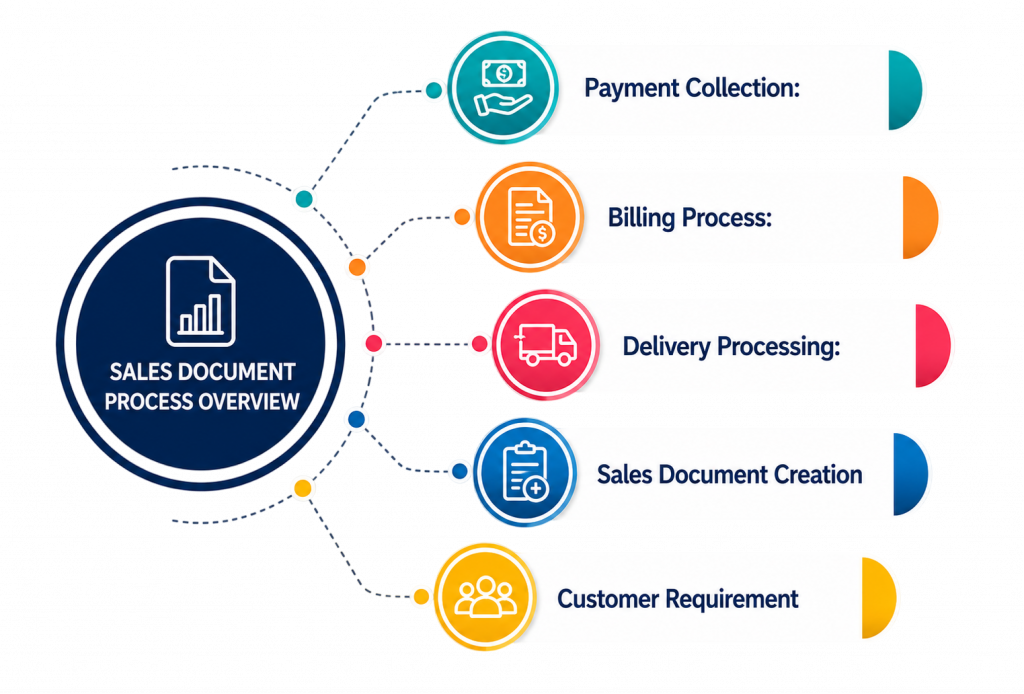
- Customer Requirement: The sales process begins when a customer expresses a need for a product or service. This requirement may come in the form of an inquiry, quotation request, or direct order. Understanding customer requirements accurately is essential because it forms the foundation of the entire order-to-cash cycle. SAP SD helps organizations capture customer requirements efficiently and maintain complete transaction records for future reference.
- Sales Document Creation: SAP SD supports the creation of various sales documents such as inquiries, quotations, contracts, and sales orders. These documents store important information including customer details, product information, quantities, pricing, and delivery schedules and SAP Tutorial. Sales documents ensure consistency throughout the sales process and provide complete visibility into customer transactions. They also facilitate communication between sales, logistics, and finance teams.
- Delivery Processing: After a sales order is approved, SAP SD initiates delivery processing activities. This includes creating delivery documents, performing picking and packing operations, and preparing goods for shipment. Delivery processing ensures that the correct products are delivered to customers according to agreed schedules. The process also helps organizations monitor delivery status and improve customer satisfaction through timely fulfillment.
- Billing Process: Once products are delivered, SAP SD generates billing documents based on sales and delivery information. Billing ensures customers are charged accurately according to agreed prices, discounts, taxes, and payment terms and learn about SAP Simple Finance. The billing process automatically transfers financial information to SAP Finance, reducing manual work and improving financial accuracy. Various billing types such as invoices, credit memos, and debit memos are supported.
- Payment Collection: The final stage of the sales process involves collecting payments from customers. Payment information is processed through integrated financial systems to ensure proper accounting and reconciliation in SAP SD tools. Timely payment collection improves cash flow and supports financial stability. SAP’s integration with financial modules enables organizations to track outstanding receivables, monitor payment status, and manage customer credit effectively.
Get Your SAP SD Certification by Learning from Industry-Leading Experts and Advancing Your Career with ACTE’s SAP SD Training.
Inquiry and Quotation Process
- Inquiry Creation: An inquiry is created when a customer requests information about products, services, pricing, or delivery schedules without committing to a purchase. It serves as the first point of contact between the customer and the sales organization. and learn more about SAP S4 HANA Tutorial. SAP SD records inquiry details systematically, allowing sales representatives to respond quickly and accurately while maintaining a history of customer interactions.
- Quotation Preparation: A quotation is prepared in response to a customer inquiry and contains detailed information about products, prices, discounts, delivery dates, and terms and conditions. Quotations help customers evaluate available options before making a purchase decision. SAP SD enables organizations to create professional and accurate quotations while ensuring pricing consistency across different customers and sales channels.
- Customer Evaluation: Customers review the quotation and compare it with other offers available in the market. During this stage, factors such as pricing, product quality and SAP SD tools, delivery commitments, and service levels influence the customer’s decision. SAP SD allows sales teams to track quotation status and gain visibility into potential business opportunities, helping them improve sales conversion rates.
- Quotation Follow-Up: Sales representatives actively monitor quotations after they are issued. Follow-up activities may include customer discussions, negotiations, pricing adjustments, or clarification of terms and conditions and leaen more about SAP ABAP Tutorial with Examples For Beginners. Effective follow-up helps strengthen customer relationships and increases the likelihood of securing the order. SAP SD tools for tracking quotation validity periods and managing follow-up activities efficiently.
- Conversion to Sales Order: Once a customer accepts the quotation, it can be converted directly into a sales order within SAP SD. This eliminates duplicate data entry, reduces processing time, and improves accuracy. The conversion process transfers all relevant quotation information into the sales order, ensuring continuity throughout the sales cycle and enabling faster order fulfillment.

Sales Order Processing
- Sales Order Creation: A sales order is created when a customer confirms the intention to purchase products or services. The sales order serves as the primary document for processing customer requests and contains information such as material details, quantities, pricing, delivery dates, shipping instructions, and payment terms. It acts as the central reference document for all subsequent sales activities.
- Availability Check: During sales order processing, SAP automatically performs an availability check to determine whether sufficient stock is available to meet customer demand. If inventory is insufficient, the system can suggest alternative delivery dates or quantities. This functionality helps organizations manage customer expectations and optimize inventory utilization while minimizing stock shortages.
- Pricing Determination: SAP SD automatically determines pricing based on predefined pricing procedures and condition records. The system calculates product prices, discounts, surcharges, freight charges, and taxes according to business rules SAP MM Tutorial from Scratch For Freshers. Automated pricing ensures consistency across transactions, reduces manual errors, and enables organizations to implement complex pricing strategies efficiently.
- Credit Check: Before processing the order further, SAP performs a credit check to evaluate the customer’s financial standing and available credit limit. This helps organizations minimize financial risk by preventing sales to customers with outstanding debts or insufficient credit capacity. Credit management plays a crucial role in maintaining healthy cash flow and reducing bad debt exposure.
- Order Confirmation: After successful validation of inventory availability, pricing, and credit status, the sales order is confirmed. The confirmed order is then forwarded for delivery processing and billing activities. Order confirmation provides assurance to customers that their requirements have been accepted and scheduled for fulfillment. It also enables organizations to plan logistics and resource allocation effectively.

Get JOB Oriented SAP SD Training for Beginners By MNC Experts
- Instructor-led Sessions
- Real-life Case Studies
- Assignments
Delivery and Shipping Process
The Delivery and Shipping Process in SAP SD manages the movement of products from the warehouse to the customer. After a sales order is confirmed, a delivery document is created to initiate shipping activities. Warehouse teams perform picking and packing operations based on delivery requirements, and goods issue is posted once products leave the warehouse. This process updates inventory records and records the movement of goods. SAP SD helps organizations track shipments, monitor delivery status, and ensure products reach customers on time. Efficient delivery and shipping management improve customer satisfaction, reduce operational delays, and support accurate inventory control throughout the distribution network.
Want to Master SAP SD? Explore the SAP SD Master Program Offered at ACTE Today!
Billing and Invoice Management
Billing and Invoice Management in SAP SD is a key process responsible for generating invoices and recording revenue transactions once goods or services are delivered to customers. It ensures that all billing activities are accurate, transparent, and aligned with business and financial rules and SAP FICO Tutorial Step by Step For Freshers. Billing documents are created based on sales orders, delivery documents, or service confirmations, depending on the business scenario. During this process, SAP automatically calculates pricing conditions such as discounts, surcharges, freight charges, and applicable taxes, ensuring accuracy in the final invoice amount.
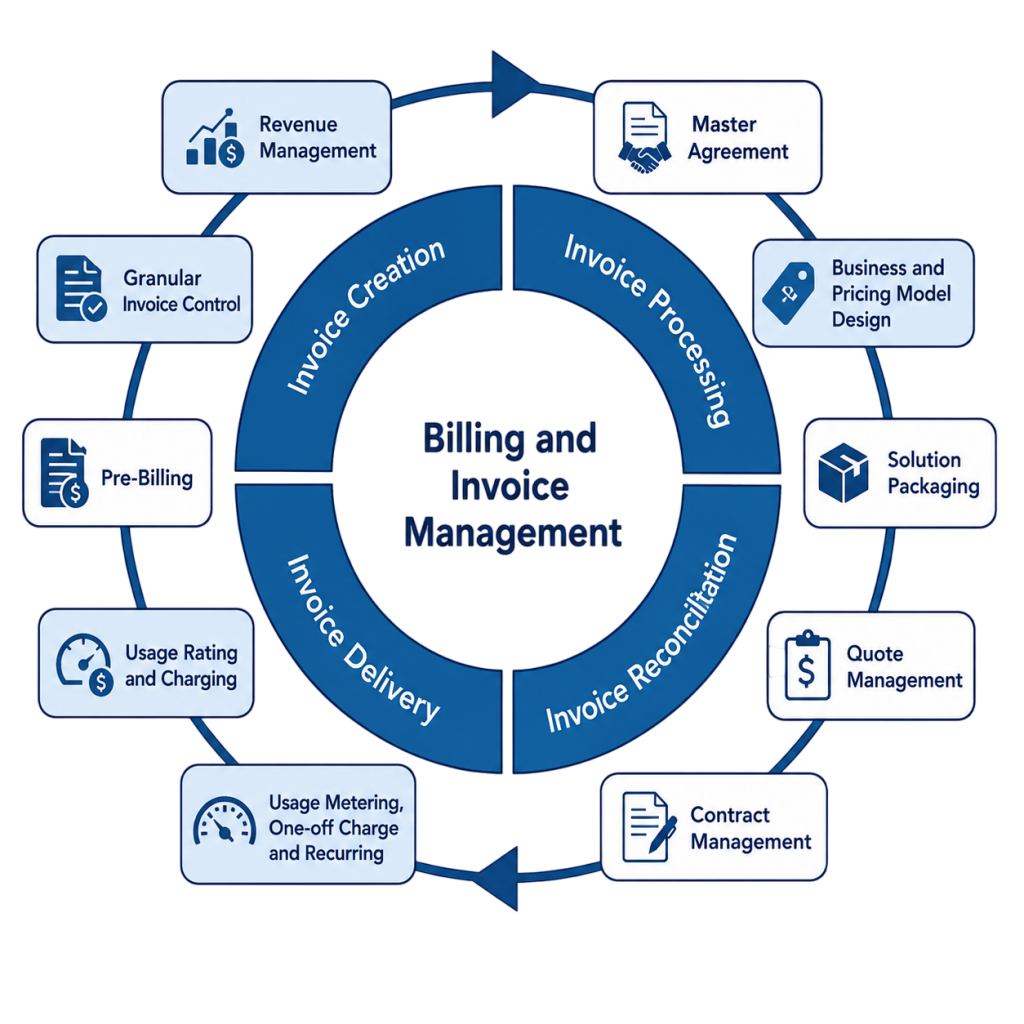
SAP SD supports multiple billing types including standard invoices, credit memos for returns or adjustments, debit memos for additional charges, and billing cancellations when documents need correction. This flexibility allows businesses to handle different customer and transaction requirements efficiently and SAP Security Level. The billing process is fully integrated with SAP Financial Accounting (FI), meaning that once an invoice is generated, the system automatically posts accounting entries, updates revenue accounts, and reflects the transaction in financial statements in real time.
Set to Ace Your SAP SD Job Interview? Check Out Our Blog on SAP SD Interview Questions & Answer
Reporting and Integration with Other SAP Modules
SAP SD provides comprehensive reporting tools that help organizations analyze sales performance, customer activities, order status, delivery efficiency, and revenue trends. Standard reports and analytics enable management to make informed business decisions based on real-time data in SAP SD Training. SAP SD also integrates seamlessly with other SAP modules such as Materials Management (MM), Finance (FI), Production Planning (PP), Warehouse Management (WM), and Customer Relationship Management (CRM). This integration ensures smooth information flow across departments and eliminates data duplication. By combining reporting and integration capabilities, SAP SD supports operational transparency, process optimization, and better coordination throughout the organization.
Conclusion and Next Steps in SAP SD
SAP SD plays a vital role in managing sales, distribution, delivery, and billing activities within an organization. By understanding enterprise structure, master data, sales processing, delivery management, and billing functions, learners can build a strong foundation in SAP SD. These concepts help organizations improve customer service, streamline sales operations, and optimize the order-to-cash cycle in SAP SD Training . After mastering the basics, learners can advance to topics such as pricing configuration, output determination, credit management, sales analytics, SAP S/4HANA enhancements, and integration scenarios. Practical hands-on experience, project exposure, and certification preparation are valuable next steps for developing expertise and pursuing a successful career in SAP SD.